We'll also set a temporary cookie to hide this notice.
Contact BT.Shareplans@cm.mpms.mufg.com and include your name, employee number, the affected share type, a clear description of the issue, the date and time, and screenshots where available.
You will receive an acknowledgement within 5 business days. If a detailed investigation is required, an acknowledgement will be issued in 5 business days and a final response in 4 weeks or 8 weeks in complex cases.
Submit a formal complaint through BusinessQualityAssurance@cm.mpms.mufg.com. State that the message is a formal complaint and include what happened, when it happened, the outcome you are seeking and any supporting evidence. The complaint will be acknowledged within 5 days and handled under the MUFG Corporate Markets complaints process. More details can found at MPMS MUFG | Complaints (EMEA), including details of any further escalation rights.
Please contact BT.Shareplans@cm.mpms.mufg.com. Provide the dates and times, the action attempted, number and type of shares, screenshots or error messages, contact history and any evidence supporting the alleged loss. Each case will be assessed on its evidence and circumstances. Submitting a complaint does not guarantee compensation.
BT Group plc appointed MUFG Corporate Markets with the aim of bringing its share plans together under a single provider and delivering a more joined-up service for colleagues.
We recognise that the launch experience has not met expectations for some colleagues. BT Group plc and MUFG Corporate Markets are working together to stabilise the service and address the issues reported.
The known service issues identified were addressed over the weekend of 7 and 8 November 2026. MUFG Corporate Markets continues to closely monitor the service and take appropriate action to support its ongoing stability and smooth operation. Any individual issues or queries already raised are being reviewed and addressed, with updates provided directly where appropriate.
Steps have been taken over the weekend, 7 and 8 November, to ensure there are no access issues. However, if you are experiencing access issues, first try clearing your cookies in your cache, close and reopen the website or app and check that you are using the current registration or sign-in link:
SSO: https://btgroupcloud.sharepoint.com/sites/intra-share-plans
APP: BT Share Plans | MUFG Investor Centre Share Plans Portal
If the page does not load, you receive a server error or sign-in continues to fail, take a screenshot and note the date and time. Contact BT.Shareplans@cm.mpms.mufg.com and include the error message, the device and browser used, and whether the issue affects the website, app or both. Do not share your password or full security credentials.
Please check your junk or spam folder and search for an email from employee.shareplans@bt.com
Your Investor Code (IVC) can be found at the top of your ‘Welcome to your BT share plans’ email, which was sent on Tuesday 3 November 2026.
If you are unable to locate the email or your Investor Code, please contact us:
Email: BT.Shareplans@cm.mpms.mufg.com
Telephone: 0371 664 0403
MiFID questions may be required before certain investment services or share sales can be completed. Answer the questions using your own circumstances. If the correct company is not listed or you cannot continue, contact BT.Shareplans@cm.mpms.mufg.com providing a screen shot, or call 0371 664 0403.
Only use the approved secure route to place a sale instruction outside of the MUFG Investor Centre portal which is: Call 0371 664 0403. Confirm only the information specifically requested. Never include your password, full security answers or unnecessary identity details.
All bank mandate details that were entered into the MUFG Investor Centre from Tuesday 3rd November 2026 have now been updated.
If you enter your bank mandate details now, they will be updated immediately. Please ensure you update your BT plc HR system with any changes.
If the details are not visible, contact BT.Shareplans@cm.mpms.mufg.com or call 0371 664 0403 and provide the date and approximate time of the update.
Only use the approved secure route to place a sale instruction outside of the MUFG Investor Centre portal which is: Call 0371 664 0403. Confirm only the information specifically requested. Never include your password, full security answers or unnecessary identity details.
You should be able to see your directshare, allshare, yourshare and dividend shares via the MUFG Corporate Markets Investor Centre portal. If one of these holding is absent from the MUFG Investor Centre, contact BT.Shareplans@cm.mpms.mufg.com or call 0371 664 0403 with the share type, expected quantity and a recent statement or screenshot if available.
The following remain with Equiniti/EQI: EasyShare shares, Ordinary certificated shares, shares in your ISA/ Investment Account. Please contact EQ with any queries related to these shares.
In the below table you will find a table confirming MUFG Corporate Markets terminology vs what you saw when your directshare (SIP) was with EQ.
If you have available shares and conditional shares you will find these under the tax free and taxable shares section of the portal which you are able to sell. Where tax is due, this will be collected by MUFG Corporate Markets and paid across to payroll on your behalf.
MUFG Investor Centre Terminology |
|
Plan Name | directshare (SIP) |
Tax Free Shares | Available Shares |
Taxable Shares | Conditional Shares |
Partnership | Shares you have purchased via the directshare plan |
Matching | Not Applicable |
Free | Allshare/yourshare awards |
Dividend | Dividend Shares |
RSU | Not Applicable |
Action | Will take you through to your options, i.e transfer/ sell |
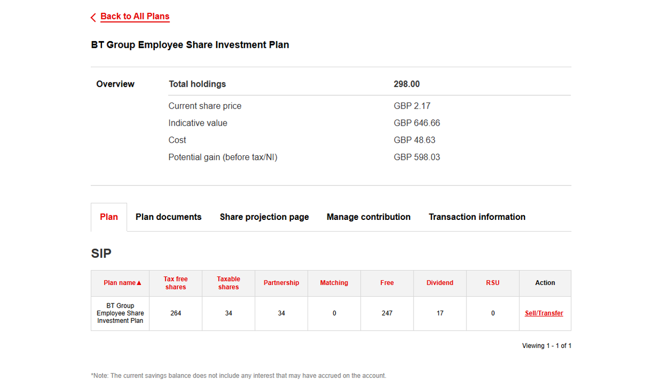
directshare/allshare/yourshare and dividend shares (together SIP shares): These shares are your directshare (SIP) shares held with MUFG Corporate Markets and are your plan shares. You can view and transact on these shares via the MUFG Investor Centre portal.
EasyShare: For any shares you own and hold in EasyShare, EQ will continue to administer these, and you can continue to access your account online.
You will be able to view your contributions in the ‘Manage Contribution’ section of the portal/ app. You will also be able to change your contribution, stop/ restart or make a lump sum election in this part of the portal/app.
You will be able to view your dividend preference in the ‘Payments’ section of the portal/app. You will also be able to change your dividend election in this part of the portal/app.
You will need to navigate to your portfolio and select ‘View Plan’ next to your directshare (SIP) plan and then select ‘Sell/Transfer’ in the ‘Action’ column.
Please DO NOT use the ‘Transact’ button under ‘Trade Shares’ in the top ribbon when in MUFG Investor Centre web portal. If you hover over ‘Trade Shares’ then the ‘Sell/Transfer’ option will be available to you here too.
No. The share price displayed in your portfolio is based on the closing BT Group plc share price from the previous trading day and is used to provide an estimated value of your holding.
If you choose to sell your shares using the ‘Sell Now’ option, you will be provided with a live market price before confirming your sale.
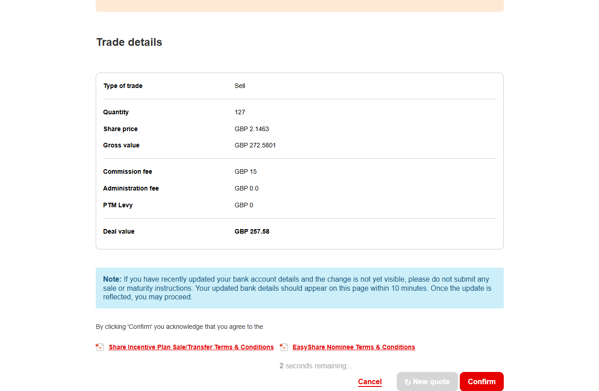
If you place a trade on the MUFG Investor Centre portal/app you will be asked to confirm the price before proceeding. This is the price that your shares will be sold at. You will also find confirmation of your sale and price in the ‘Transaction’ section of the portal. A sales notice will be sent to you in the post one day after the sale has completed and your sale price will be confirmed on the sales advice statement.
Please note that MUFG Corporate Markets are aware that some sales advice notices have not been dispatched due to the technical issues that were experienced between Tuesday 3rd November and Friday 6th November. MUFG Corporate Markets will be dispatching these sales notices on Wednesday 11th November.
This will depend on the dealing option you select:
Sell Now: This is a real-time dealing option. A live market price will be displayed for you to review. If you choose to accept the price and confirm the sale within the time provided, your shares will be sold at the price quoted.
Next available trading day: If your sale request is received before 9:00am UK time on a UK working day, your shares will normally be sold that day. Requests received after 9:00am will normally be sold on the next UK working day.
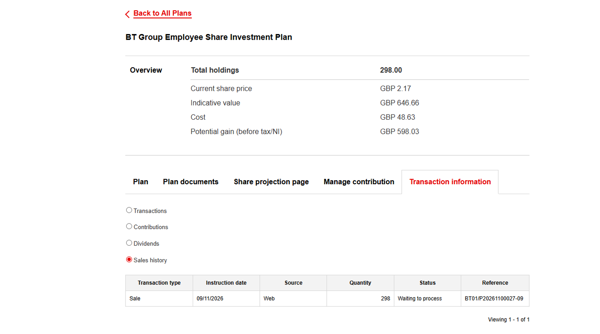
If your sale shows as ‘In Progress’, this does not mean that your shares have not been sold. The status will remain ‘In Progress’ until the trade has settled in the market, which is normally two UK working days after the trade date (T+2).
Once settlement has completed, the status will update to ‘Completed’.
If the sale proceeds are tax-free, the proceeds will be paid to you following settlement.
If the sale proceeds are subject to tax, the proceeds will be sent to your employer’s payroll for the appropriate deductions to be made and will then be paid to you at the next available opportunity.
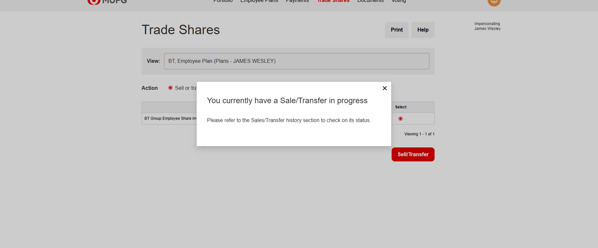
If you have sold your shares but they are still showing in your portfolio, this does not mean that the sale has not been completed.
The shares will remain visible in your portfolio until the trade has settled in the market, which normally occurs two UK working days after the trade date (T+2).
Once settlement has completed, the shares will be removed from your portfolio and the sale status will update from ‘In Progress’ to ‘Completed’.
If the sale proceeds are tax-free, the proceeds will be paid to you following settlement. If the proceeds are subject to tax, they will be sent to your employer’s payroll for the appropriate deductions to be made and will then be paid to you at the next available opportunity.
Sale proceeds will be sent 3 working days after we receive your sale instruction and will be credited to your personal bank account subject to your bank’s processing times. If income tax or national insurance is due, the proceeds will be paid through payroll on the next available date.
The charges are:
Online sale: 0.5%, min £15.
Telephone sale: 0.5%, min £15.
Transfer to another broker or provider: £0
Yes. You can transfer shares to your Equiniti Financial Services Limited EasyShare account by electing to transfer to ‘Nominee’ using the Sell/ Transfer link under ‘action’ in your account.
If you do not have an Equiniti Financial Services Limited EasyShare account, Equiniti will open one for you subject to the EasyShare Terms and Conditions. You can review the terms at Equiniti Shareview | Corporate Sponsored Nominee or call +44 (0) 808 100 4141.
If you do not meet the EasyShare Terms and Conditions, you will be sent a share certificate to your home address.
Income tax and national insurance may apply if your shares have been held for less than five years. Keeping them in directshare may also protect them from CGT. Contact MUFG Corporate Markets for further details.
Before leaving, check that you can access your account, your personal email address and bank details are correct, and you understand what happens to your directshare (SIP). Guidance can be found here BT Share Plans | Leaving BT.
If you leave BT, your directshare shares must leave the plan. MUFG Corporate Markets will contact you with your options and next steps. Any tax due will depend on why you leave and how long you have held the shares. Guidance can be found here BT Share Plans | Leaving BT.

Please read our cookie notice for full details of the types and details of cookies used on this website or to change your cookie settings.
© 2026 MUFG Corporate Markets. All rights reserved.
A part of MUFG Corporate Markets, a division of MUFG Pension & Market Services